HDMI eARC and HDMI 2.1, Explained
One socket on your receiver is the eARC output and the rest are not. Three of its inputs are HDMI 2.1 and the rest are not. Both facts are published, and both surprise people.

Disclosure: we earn a commission if you buy through the links on this page, at no extra cost to you. It does not influence what we pick — our criteria are published and reproducible, so you can check our work. How we pick · Full disclosure
These picks are spec-and-price analyses, not listening tests. We have not heard this gear and we do not pretend to have: every figure below is sourced to the manufacturer and linked, and every price is live or not shown at all. Here are the rules we followed.
Quick picks
Ranked on the published criteria in How We Pick. Prices are live as of October 15, 2026. Tap any row for the full write-up.
- 8.2$649.00View on Amazon
$899.9928% off
- 9.0
- 8.2
- 7.6$999.00View on Amazon
$1,300.0023% off
| # | Product | Best for | Score | Price |
|---|---|---|---|---|
| 1 | 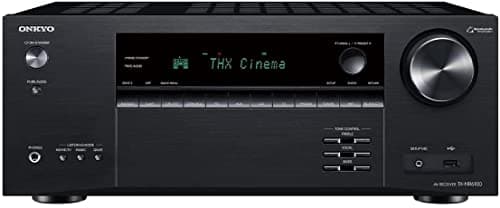 Onkyo TX-NR6100 THX certified with three 4K120 HDMI inputs, which is the specific spec that matters if two consoles and a PC share the same receiver. | Best for gaming | 8.2 | $649.00View on Amazon $899.9928% off |
| 2 | 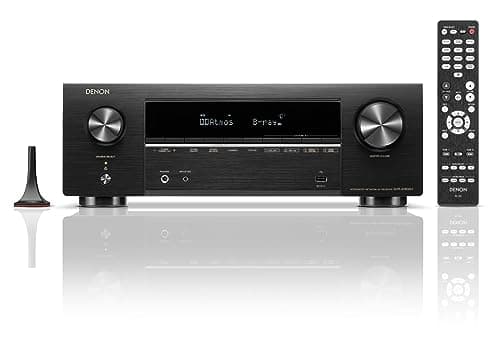 Denon AVR-X1800H Seven channels, 8K passthrough and Audyssey MultEQ XT — the room correction being the feature that actually changes what you hear in a real room. | Best overall under $1,000 | 9.0 | |
| 3 | 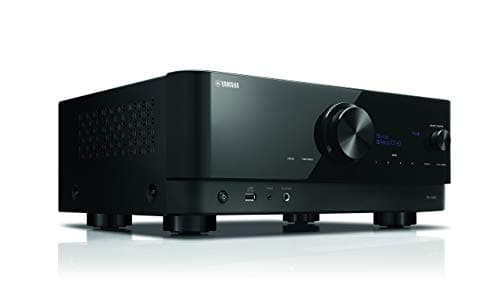 Yamaha RX-V6A The most powerful receiver here on paper — 100 watts a channel rated across the full band — with a phono input and seven HDMI inputs. | Best for music as well as film | 8.2 | |
| 4 | 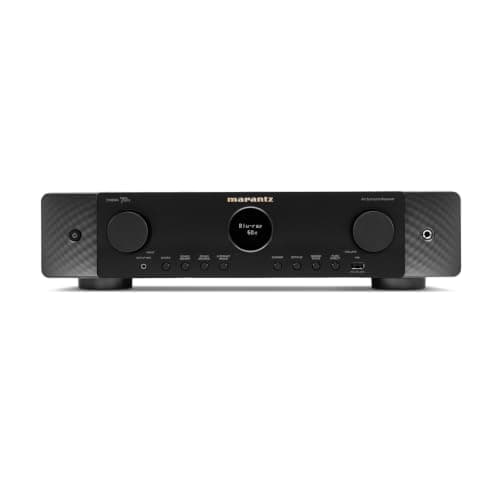 Marantz Cinema 70s A 7.2 receiver in a half-height chassis, which is the entire point — it fits furniture a normal receiver does not. | Slimmest chassis | 7.6 | $999.00View on Amazon $1,300.0023% off |
ARC and eARC send audio backwards down an HDMI cable — from the television to the receiver, rather than the usual direction. That is what lets a television’s built-in apps play through your speakers without a second cable.
The upgrade from ARC to eARC is about how much audio can travel that path, and HDMI publishes the answer.
What eARC is specified to carry
From HDMI’s own specification page, eARC:
“supports the latest high-bitrate audio formats up to 192kHz, 24-bit, and uncompressed 5.1 and 7.1, and 32-channel uncompressed audio. It also supports DTS-HD Master Audio, DTS:X, Dolby TrueHD, Dolby Atmos.”
Those four format names are the point. TrueHD and DTS-HD Master Audio are lossless soundtrack formats; Dolby Atmos on Blu-ray rides on top of TrueHD. They are the formats the older ARC connection and an optical cable cannot carry.
bitrate = sample rate × bit depth × channels
Inputs
- HDMI's published eARC ceiling: 192 kHz, 24-bit, up to 32-channel uncompressed (HDMI — eARC specification page)
- Optical input ceiling on the DACs we cover: 192 kHz / 24-bit, stereo PCM (Topping E30 II spec page)
- WiiM's published optical input limitation: “stereo PCM only” — Dolby Digital and DTS explicitly unsupported (WiiM spec comparison)
Result
Optical, stereo: 192,000 × 24 × 2 = 9.2 Mbps
eARC, uncompressed 7.1: 192,000 × 24 × 8 = 36.9 Mbps
eARC, 32-channel: 192,000 × 24 × 32 = 147.5 Mbps
eARC’s published channel ceiling is sixteen times the stereo capability of the optical connections on every DAC we cover. That is why the format list is different — it is not a quality preference, it is a capacity difference with published numbers on both sides.
These figures describe uncompressed payloads at each specification’s stated ceiling. Real soundtracks are usually compressed and use far less. The comparison shows the headroom each path is specified for, not what a given film consumes.
The part almost nobody checks: only one port is the eARC port
eARC lives on the HDMI output, not on the inputs. On the receivers we cover:
| Receiver | HDMI in / out | eARC |
|---|---|---|
| Denon AVR-X1800H | 6 in / 1 out | Yes, on the single output |
| Yamaha RX-V6A | 7 in / 1 out | Yes, on the single output |
| Onkyo TX-NR6100 | 6 in / 2 out | Both outputs are HDMI 2.1 |
So the cable that carries audio back from your television has to be plugged into that specific socket, and the television’s HDMI port has to be its eARC port too. Both ends have to support it. This is the single most common reason an eARC connection silently falls back to plain ARC.
The finding: an 8K receiver is 8K on some inputs
This is the part that costs people money, and every manufacturer publishes it plainly enough — in a footnote.
| Receiver | Which inputs are HDMI 2.1 | What the rest are |
|---|---|---|
| Onkyo TX-NR6100 | Inputs 1–3 and both outputs | Inputs 4–6 are HDMI 2.0, capped at 4K/60 |
| Denon AVR-X1800H | 3 of the 6 inputs are 8K | The other three are not |
| Yamaha RX-V6A | 8K on inputs 1–3 only | Inputs 4–7 are not 8K |
Three receivers, three manufacturers, and all three give you exactly three HDMI 2.1 inputs. If you own a PlayStation 5, an Xbox Series X and a 4K Blu-ray player, you have filled them. Add a fourth device that wants 4K/120 and it goes on a 2.0 port, where it will run at 4K/60.
This is also the specification that ages a receiver, which is why our under-$1,000 roundup counts the fast inputs rather than the inputs when it ranks the same three machines on everything else — power under a stated condition, room correction, pre-outs and the phono stage.
Onkyo is the clearest about it, publishing input numbers with the split stated. Onkyo’s three HDMI 2.1 inputs are also the reason it is the pick on this page for anyone with consoles — it is not more 2.1 ports than the others, it is the same three, published unambiguously.
The other HDMI 2.1 features, and which receivers publish them
The video features that travel with HDMI 2.1 matter to gaming more than to film.
- VRR— variable refresh rate, so the display matches the console’s frame output rather than tearing or stuttering.
- ALLM — auto low latency mode, which switches the television into game mode automatically.
- QFT — quick frame transport, which reduces latency by sending each frame faster.
Denon publishes VRR, QFT and ALLM for the AVR-X1800H along with 8K/60 Hz and 4K/120 Hz passthrough. Yamaha publishes 8K/60 and 4K/120 for the RX-V4A. Onkyo publishes HDMI 2.1 at 8K/60 and 4K/120 on inputs 1–3 and both outputs.
If you have no console, none of this changes anything about how a film sounds or looks.
When you still need optical, and when you should not use it
Optical remains genuinely useful in two situations: connecting an older device that has no HDMI audio output, and breaking a ground loop, because an optical link makes no electrical connection between the boxes at all.
It is the wrong choice when the formats matter. Every device we cover states its optical limits explicitly — WiiM publishes “stereo PCM only” for the Pro Plus’s optical input, with Dolby Digital and DTS unsupported; Denon publishes linear PCM for the PMA-600NE’s optical and coaxial inputs. The comparison is worked through in optical vs coaxial vs USB.
There is a middle case worth knowing about. The WiiM Ultra publishes an HDMI ARC input accepting PCM and Dolby Digital 5.1, while the WiiM Amp publishes HDMI ARC as stereo PCM only with Dolby Digital and DTS not supported. Same connector, same brand, different capability — which is exactly why the format list matters more than the socket name.
Who decodes, and why it changes what you should set
There are two ways audio can travel from a source to your receiver, and the setting that chooses between them is buried in every device’s audio menu.
Bitstream sends the undecoded soundtrack and the receiver decodes it. This is what you want for Dolby Atmos and DTS:X, because the receiver is the box that knows how many speakers you have and where they are.
PCM means the source decodes it and sends the finished channels. The receiver then has less to do — and on some devices, less it is able to do, because object-based formats like Atmos have already been rendered to a fixed channel layout before they arrive.
The practical rule: set the source to bitstream when the receiver supports the format, and to PCM when it does not. That second case is common. Denon’s own info sheet for the AVR-S670H lists no Atmos and no DTS:X — Dolby TrueHD, Digital Plus and Pro Logic II only — while Denon’s product page title for the same model says “with Dolby Atmos”. We publish both, and we lean on the spec table. If Atmos is the reason you are buying, verify before you do.
Bass management still happens after eARC
Getting a lossless soundtrack into the receiver is only the first half. What the receiver then does with it is decided by the settings the calibration routine writes — speaker sizes, crossover frequencies, distances and levels.
It is worth saying because the two get confused. eARC is a transport question: can the audio physically get here. Bass management is a routing question: where does each frequency go once it has. A perfect eARC connection into a receiver that thinks your bookshelf speakers are “large” will still send them bass they cannot produce, and the subwoofer will sit idle.
Check the speaker sizes and crossovers after any change to the connection, not just after a speaker change.
Cables
For 8K/60 or 4K/120 you need a cable certified for the bandwidth. For eARC audio alone, an existing high-speed HDMI cable is normally fine, because eARC’s audio payload is a small fraction of a video signal’s.
We do not have a cable specification we can compare and rank, so we are not recommending one. Buy a certified cable of the right category and stop there.
The practical checklist
- Television to receiver:the television’s eARC port to the receiver’s HDMI output. Not an input.
- Both ends must support eARC, not just the receiver. If either is ARC-only, you have ARC.
- Enable it. On most televisions eARC is a menu setting, often alongside a CEC control that has to be on as well.
- Put your 4K/120 sources on inputs 1–3 and everything else on the rest. The 2.1 inputs are a subset on every receiver we cover.
- If a soundtrack format is missing, check the television’s output setting before assuming the receiver is at fault.
Step four is where most of the complaints come from, and it is worth knowing how few of those fast inputs each maker actually publishes before you buy. It is three of six on the Denons and the Marantz, three of seven on the Yamaha RX-V6A, and only Onkyo states which three. Our gaming roundup ranks the receivers on that number and on whether each maker will put VRR in a specification table at all — and it covers the eARC-only route, where the console goes straight to the television and the receiver never sees the video.
Every pick in detail
Every specification below links to the manufacturer document we read it from. Where a manufacturer does not publish a figure, we say so rather than estimating it.
Onkyo TX-NR6100
Best for gamingTHX certified with three 4K120 HDMI inputs, which is the specific spec that matters if two consoles and a PC share the same receiver.
- channels
- 9/10
- room correction
- 6/10
- connectivity
- 10/10
- value for money
- 8/10
- future proofing
- 8/10
| Specification | Published value | Source |
|---|---|---|
| Channels | 7.2, THX certified | Onkyo product page |
| Power output | 100 W/ch (8 Ω, 20 Hz – 20 kHz, 0.08% THD, 2 ch driven, FTC). The “210 W per channel” figure circulating in search results is a dynamic-power marketing number, not the FTC rating. | Onkyo product page |
| Room correction | AccuEQ with AccuReflex. Dirac Live is NOT available on this model — Onkyo starts Dirac at the TX-NR7100. | Onkyo receiver buying guide |
| Dolby Atmos / DTS:X | Yes / Yes (5.2.2 playback) | Onkyo spec page |
| Phono input | Yes — MM, 3.5 mV rms / 47 kΩ | Onkyo spec page |
| HDMI in / out | 6 in / 2 out. HDMI 2.1 (8K/60, 4K/120) on inputs 1–3 and both outputs; inputs 4–6 are 2.0 up to 4K/60 | Onkyo spec page |
| Streaming | Chromecast built-in, AirPlay 2, DTS Play-Fi, works with Sonos | Onkyo spec page |
| HDMI 2.1 gaming features | “HDMI 2.1 features are supported on HDMI inputs 1–3, Main Out, and Sub/Zone 2 Out in Sub Mode output including VRR, ALLM, QFT (Quick Frame Transport), DSC (Display Stream Compression), QMS (Quick Media Switching), and eARC (Main Out).” Inputs 4–6 carry HDMI 2.0 features only. | Onkyo spec page |
| Power consumption | 635 W operating, 65 W idle (on, not playing), 0.1 W standby | Onkyo spec page |
| Pre-outs | Subwoofer pre-out (1 V rms / 470 Ω) and a Zone 2/Zone B line-out (200 mV rms / 470 Ω). No main-channel pre-outs are listed | Onkyo spec page |
Pros
- Three HDMI 2.1 inputs at 8K/60 and 4K/120 — the most console-friendly receiver here
- THX certified
- MM phono input, which is unusual on a gaming-focused receiver
- 100 W/ch FTC-rated into 8 Ω across the full band
Cons
- Room correction is AccuEQ, NOT Dirac Live — Onkyo starts Dirac at the TX-NR7100, and this model has no upgrade path to it
- The “210 W per channel” figure in most search results is dynamic-power marketing; the FTC rating is 100 W
- HDMI inputs 4–6 are only HDMI 2.0, capped at 4K/60
Skip it if you have one source — you are paying for HDMI 2.1 inputs you will never fill.
Denon AVR-X1800H
Best overall under $1,000Price as of October 15, 2026. #ad
Seven channels, 8K passthrough and Audyssey MultEQ XT — the room correction being the feature that actually changes what you hear in a real room.
- channels
- 9/10
- room correction
- 9/10
- connectivity
- 9/10
- value for money
- 9/10
- future proofing
- 9/10
| Specification | Published value | Source |
|---|---|---|
| Channels | 7.2 (7 power amplifiers — 7.2 or 5.2.2) | Denon info sheet (PDF) |
| Power output | 80 W + 80 W (8 Ω, 20 Hz – 20 kHz, 0.08% THD, 2 ch driven) | Denon info sheet (PDF) |
| Room correction | Audyssey MultEQ XT, with Dynamic EQ and Dynamic Volume | Denon info sheet (PDF) |
| Dolby Atmos / DTS:X | Yes / Yes | Denon info sheet (PDF) |
| Phono input | Yes — MM, 2.5 mV input sensitivity; RIAA deviation ±1 dB (20 Hz – 20 kHz); S/N 74 dB (IHF-A); distortion 0.03% (1 kHz, 3 V) | Denon owner's manual, audio section |
| Analog input sensitivity | 200 mV; frequency response 10 Hz – 100 kHz (+1, −3 dB, Direct mode); S/N 98 dB (IHF-A, Direct mode) | Denon owner's manual, audio section |
| Power consumption | 430 W. Standby 0.1 W — but only with Network Control set to “Off In Standby” and HDMI Pass Through off; CEC standby is 0.5 W. Denon publishes no idle (powered-on, not playing) figure at all. | Denon owner's manual, general section |
| HDMI in / out | 6 in (3 are 8K) / 1 out (eARC) | Denon info sheet (PDF) |
| Video passthrough | 8K/60 Hz, 4K/120 Hz; VRR, QFT, ALLM | Denon product page |
| HDMI 2.1 gaming features | ALLM / QMS / QFT / VRR — Yes / No / Yes / Yes. Denon does not state which of the six inputs carry them beyond the “3 x 8K” count. | Denon product page |
| Pre-outs | 2.2 only (front L/R + 2 subwoofer) — NOT a full 7.2 pre-out | Denon info sheet (PDF) |
| Streaming | HEOS built-in; AirPlay 2, Spotify Connect, Amazon Music HD, TIDAL | Denon info sheet (PDF) |
Pros
- Audyssey MultEQ XT room correction — a step above the plain MultEQ on the cheaper models
- 7.2 channels — enough for a 5.2.2 Atmos layout
- MM phono input, so a turntable connects without a separate stage
- 8K/60 and 4K/120 passthrough with VRR and ALLM
Cons
- Only 2.2 pre-outs (front L/R plus subwoofers) — you cannot add external amplification to the surround channels later
- Menus are dense
- Runs warm in a closed cabinet
Skip it if you only need 5 channels — the AVR-S670H shares the same core for less.
Yamaha RX-V6A
Best for music as well as filmPrice as of October 15, 2026. #ad
The most powerful receiver here on paper — 100 watts a channel rated across the full band — with a phono input and seven HDMI inputs.
- channels
- 9/10
- room correction
- 7/10
- connectivity
- 9/10
- value for money
- 8/10
- future proofing
- 8/10
| Specification | Published value | Source |
|---|---|---|
| Channels | 7.2 | Yamaha spec page |
| Power output | 100 W/ch (8 Ω, 20 Hz – 20 kHz, 0.06% THD, 2 ch driven). Maximum effective output 150 W/ch (1 kHz, 10% THD, 8 Ω) | Yamaha owner's manual |
| Room correction | YPAO with multipoint measurement | Yamaha spec page |
| Dolby Atmos / DTS:X | Yes (with Height Virtualization) / Yes | Yamaha spec page |
| Phono input | Yes — MM, 3.5 mV / 47 kΩ at 1 kHz | Yamaha owner's manual |
| HDMI in / out | 7 in / 1 out (eARC). 8K on inputs 1–3 only | Yamaha spec page |
| HDMI 2.1 gaming features | Not published in the specification table. Yamaha's HDMI feature list for this model reads “8K, 4K Ultra HD (include 8K/60, 50 Hz, 4K/120, 100 Hz 10-bit), 3D Video, ARC, eARC, HDMI Control (CEC), Auto Lip Sync, Deep Color, x.v.Color, HDR10+, Dolby Vision, Hybrid Log-Gamma, DSC FRL, FRL” and HDCP 1.4/2.3 — VRR, ALLM, QMS and QFT are named nowhere in it, and nowhere on the 4K/8K MODE page either. Yamaha adds ALLM and VRR to this model by firmware and documents that separately from the specification. | Yamaha owner's manual, specifications |
| Pre-outs | Front L/R + 2 subwoofer, plus Zone 2 L/R — not a full 7.2 pre-out | Yamaha owner's manual |
| Streaming | MusicCast, AirPlay 2, Bluetooth (SBC/AAC), Spotify Connect | Yamaha spec page |
Pros
- 100 W/ch (8 Ω, 20 Hz – 20 kHz, 0.06% THD) — the highest full-band rating in this group
- Seven HDMI inputs, the most here
- MM phono input, 3.5 mV / 47 kΩ
- YPAO with multipoint measurement, plus MusicCast multiroom
Cons
- YPAO is less sophisticated than Audyssey MultEQ XT on the Denon
- 8K is limited to HDMI inputs 1–3
- Pre-outs are front L/R plus subwoofers only — not a full 7.2
Skip it if room correction quality is your priority — Audyssey MultEQ XT on the Denon goes further.
Marantz Cinema 70s
Slimmest chassisA 7.2 receiver in a half-height chassis, which is the entire point — it fits furniture a normal receiver does not.
- channels
- 9/10
- room correction
- 9/10
- connectivity
- 9/10
- value for money
- 5/10
- future proofing
- 8/10
| Specification | Published value | Source |
|---|---|---|
| Channels | 7.2 (7 powered channels) | Marantz product page |
| Power output | 50 W + 50 W (8 Ω, 20 Hz – 20 kHz, 0.08% THD, 2 ch driven). The slim chassis costs real power against full-size rivals. | Marantz owner's manual |
| Room correction | Audyssey MultEQ with Dynamic EQ and Dynamic Volume | Marantz product page |
| Dolby Atmos / DTS:X | Yes / Yes | Marantz product page |
| Phono input | Yes — MM, 2.5 mV; RIAA deviation ± 1 dB (20 Hz – 20 kHz) | Marantz owner's manual |
| Pre-outs | Full 7.2 — notable at this tier, where the Denon AVR-X1800H offers only 2.2 | Marantz product page |
Pros
- Half-height chassis fits furniture a normal receiver cannot
- Full 7.2 pre-outs — the Denon AVR-X1800H at a similar tier gives you only 2.2, so this is the one here you can actually add amplification to
- 7.2 channels with Audyssey MultEQ and an MM phono input
Cons
- Well over the $1,000 bracket
- 50 W + 50 W into 8 Ω — the slim chassis costs real power against full-size rivals rated at 80–100 W
- You pay a premium for the height, not the performance
Skip it if your cabinet fits a full-size receiver. The slim chassis is most of the surcharge.
Frequently asked questions
What is the difference between ARC and eARC?
Capacity. HDMI publishes eARC as supporting up to 192 kHz, 24-bit, uncompressed 5.1 and 7.1, 32-channel uncompressed audio, plus DTS-HD Master Audio, DTS:X, Dolby TrueHD and Dolby Atmos. Those lossless formats are the ones plain ARC and optical cannot carry. Both the television and the receiver have to support eARC for it to engage.
Which HDMI port is eARC on?
The receiver’s HDMI output, not any input. The Denon AVR-X1800H and Yamaha RX-V6A each publish a single HDMI output carrying eARC; the Onkyo TX-NR6100 publishes two outputs, both HDMI 2.1. On the television it is likewise one specific port, usually labeled.
Are all HDMI inputs on an AV receiver 8K?
No, and this catches people out. Onkyo publishes HDMI 2.1 on inputs 1–3 with inputs 4–6 as HDMI 2.0 capped at 4K/60. Yamaha publishes 8K on inputs 1–3 only of the RX-V6A’s seven. Denon publishes 3 of the AVR-X1800H’s 6 inputs as 8K. Three receivers, three brands, three 2.1 inputs each.
Do I need eARC if I only watch streaming apps?
Usually not. Most streaming services deliver Dolby Digital Plus, which plain ARC carries. eARC matters for lossless formats — Dolby TrueHD and DTS-HD Master Audio, which is what 4K Blu-ray uses and what Dolby Atmos rides on from disc. If your sources are all apps, plain ARC is generally sufficient.
Read next
The Best AV Receivers Under $1,000
Five receivers under $1,000, compared on FTC-rated power and the pre-out spec almost nobody mentions.
Denon AVR-X1800H Review
80 W two-channels-driven, Audyssey MultEQ XT, 8K passthrough, MM phono — and only 2.2 pre-outs.

Optical vs Coaxial vs USB
Per-input sample rate limits for every DAC we cover, the ground-loop problem only optical solves, and the surround-format trap on TV optical outputs.
Home Theater Setup: The Complete Guide
The complete setup, built on Dolby's published layout angles rather than on vibes — plus what to do when your room disagrees.
Soundbar vs Speakers
What a soundbar can and cannot physically do, and the honest case for each format.
AV Receiver Room Correction, Honestly
What Audyssey, YPAO and AccuEQ tiers actually publish, the one difference that is documented, and the physics room correction cannot beat.
The Best AV Receivers for Gaming
Ranked on published 4K/120 input count and whether VRR is in the maker's spec table, not its ad copy. The receiver with the most HDMI inputs is not on the list, and the reason is the whole page.
Sources
Every specification on this page was read from one of these documents. If one of them has changed, or we have made an error, tell us — corrections are logged and dated per our editorial policy.
- HDMI — Enhanced Audio Return Channel specification page
- Denon AVR-X1800H — HDMI inputs, eARC, video passthrough (info sheet, PDF)
- Denon AVR-X1800H — VRR, QFT, ALLM (product page)
- Yamaha RX-V6A — HDMI inputs and 8K allocation
- Onkyo TX-NR6100 — HDMI 2.1 input allocation
- Yamaha RX-V4A — video passthrough (owner's manual)
- WiiM Ultra — HDMI ARC format support
- WiiM Amp — HDMI ARC format support
- Topping E30 II — optical input limits